
Trainer Handbook


Student POV
The Trainer handbook has been designed as a tool for you to use throughout the training journey. It contains all the information you need to get started and make sure that your experience is a positive, challenging and rewarding one.
Launching as a STUDENt
Trainers have access to “launch as student”
This means you will be able to go in as the student and see exactly what they can see.
Please note, assessments must not be submitted on behalf of the trainer as the student is required to sign the declaration to confirm they have submitted theory.
The purpose of launching as a student is to be able to see what they can see, in some instances, it’s easier to see it through their eyes and to be able to help action any issues that may arise.
To Launch as student
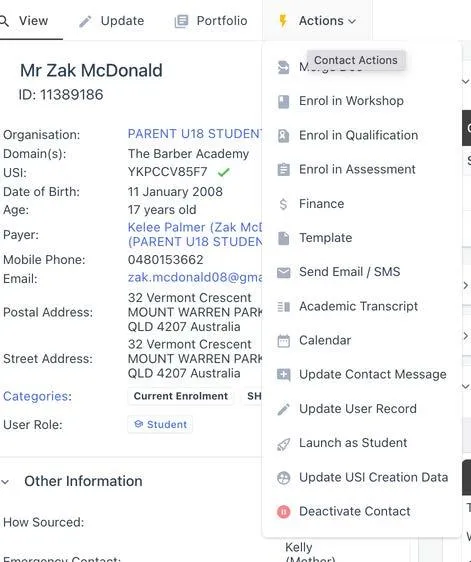
- Go to Student Profile
- Click Actions
- Click Launch as Student
You are now active as the student - you can access their portal
and see everything they can see.
To go back to Trainer Mode
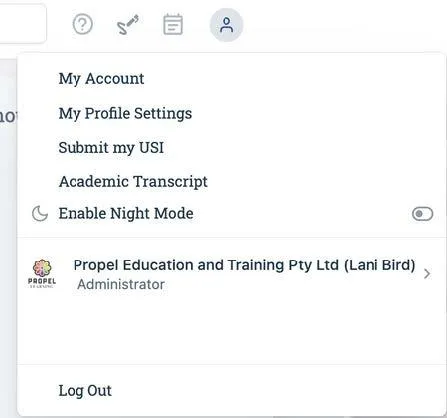
- Click on the student initials and select Log out OR you can select trainer.
This will revert you back to your trainer mode
STUDENT LOGGING IN
Follow the steps to log into aXcelerate using the Student Handbook - Access to aXcelerate
STUDENT FORGOT LOGIN DETAILS
If a student forgets their login details to aXcelerate learner portal.
- Go to student profile
- Click on Template
- Forgot login your Propel Student Portal Login method?
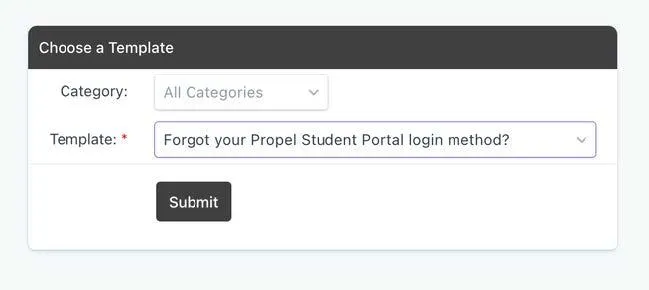
- Click Submit
- The below information will populate
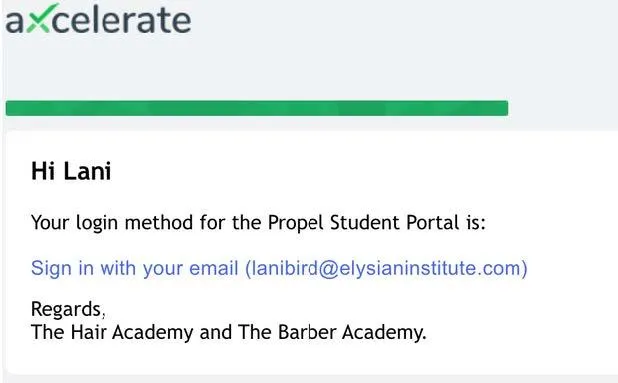
- Click save and send (this will be sent to the student)
Note: We do not have access to student password, if they forget they will need to click “reset password” and follow the prompts.
Watch Video: https://drive.google.com/file/d/1tA3YEz7WG36yfgURuhXyWlb73lFdFTNV/view
Students can now contact aXcelerate directly if they need help with aXcelerate outside of training.
Click link: https://support.axcelerate.com.au/hc/en-gb - It will take them to a chat bot where they select "I am currently studying or am a student" The aXcelerate team will be able to assist.
LOOKING AT THE STUDENT PORTAL
Video link: https://drive.google.com/file/d/12nT4YRPu6EL_yGsEsxPzvXnqBwQSKawe/view?usp=drive_link
The Student Learner Portal will look like the below (NOTE: When the student first logins in, they have the option to watch a video to guide them through the system) There is an Axcelerate APP students can download. It is recommended they use GOOGLE CHROME.
In the portal, the student can see the course/qualification they are enrolled in.
On the right hand side, they can see if there any announcements, access to any updated videos or changes in the portal.
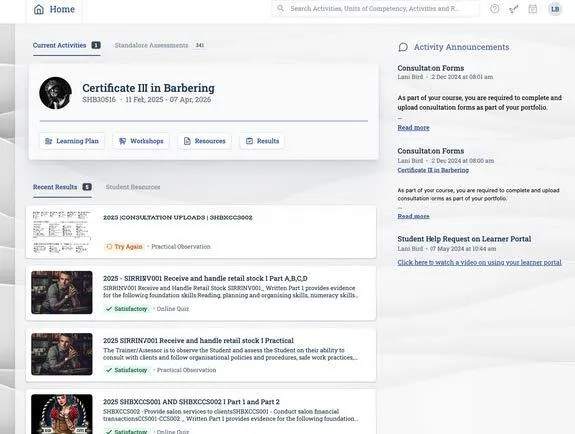
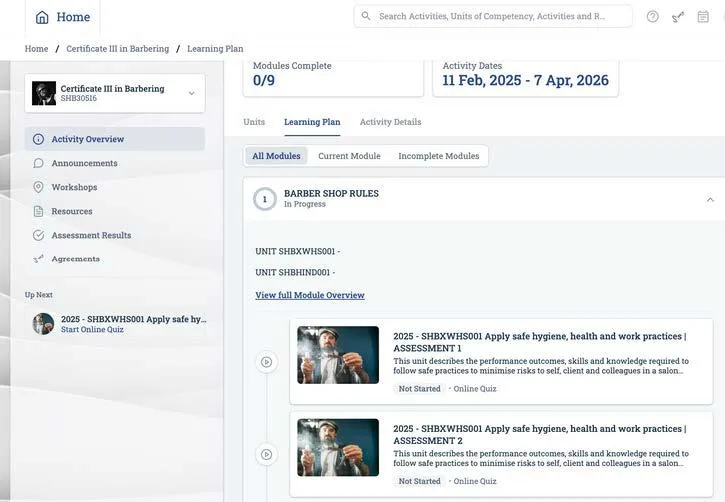
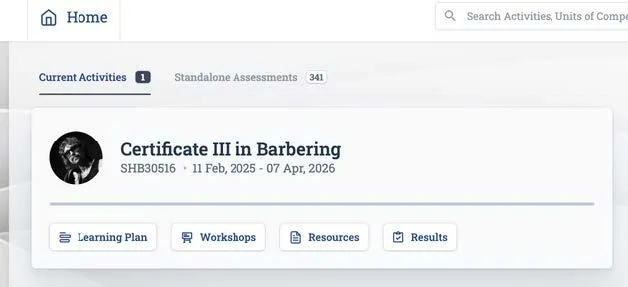
To access the theory component of the course, the student must always click on LEARNING PLAN
This will take the student to access the theory, consultations and practical Observations.
In the portal there are factsheet links to help the student answer the question.
Anything underlined is a link to a factsheet.

Some modules may be locked in the learner portal as they have a pre-requsit unit to complete first.
For example; SHBHCUT001 must be completed before SHBHCUT002/SHBHCUT003/SHBCUT004 - Once SHBHCUT001 is Satisfactory, the other modules will open automatically.
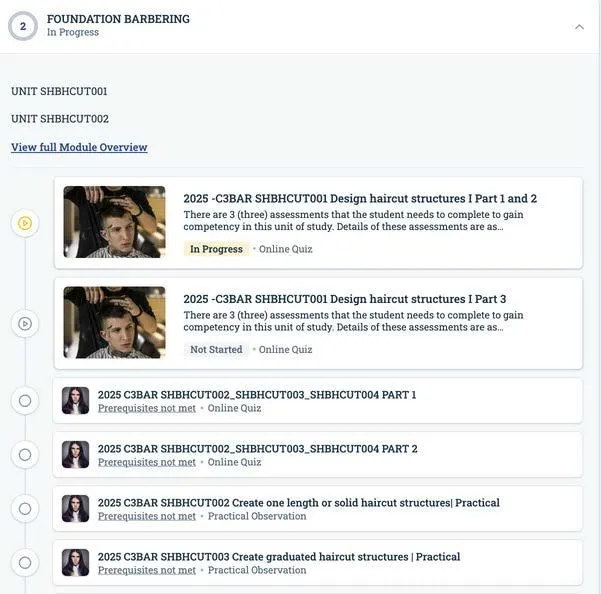
In the Practical Observation section, there are videos for the students to watch.
Note: They can only watch these videos when SHBHCUT001 is SATISFACTORY.
STUDENT RESOURCES
Barber academy students will be allocated the below training resources for their course.
- Login to Axcelerate Leaner Portal
- Login to the Hair and Barber Community
- Barber Skill Set (Barbers full time students only)
- The Barber Academy Youtube and social media pages
- 2x headblocks - 1 at the beginning, 2nd headblock will be provided half way through course
- Ebook (in Axcelerate)
- Consultation forms - THESE live in the academy on the mirrors, students are required to complete these and take a photo to upload into their learner portal
- SWOP book
- Barber kit (if applicable)
WITHDRAWAL/DEFERRAL APPLICATION
Please direct students to Student Services Officer to discuss deferrals/Withdrawals process.
Students can submit a request to Withdrawal /Deferral online - Click Here
Request to Defer
1. If a student wishes to defer from a course, they can apply with valid reasons i.e. medical or unexpected international or prolonged travel. There must ALWAYS be a timeframe, and a return to study date. Propel allow up to 3-4 weeks only with a maximum deferment time of 3 months – case
by case and decisions will be made based on requirements etc.
2. Discuss options with student to continue working without deferring. If the student still wants to defer please direct the student to the administration team and make a note on your trainer checklist.
Request Approved – Admin team will action
The trainer will receive an Axe email with details of approval of request. The Administration Team will have amended the Activity Start and End dates for all currently enrolled units in line with the approved deferment period.
Administration team will update Trainer Schedule (TeamUp) to contact student on recommencement date and remove any scheduled study support sessions already booked. Trainer will be updated on the outcome.
Request Denied
Trainer will receive instruction from Course Coordinator or Administration Manager as to any action required.
EXTENSION APPLICAtION
Students that require an extension must speak with their trainer at least 2-3 month prior to their expected end date and complete an extension form to extend the duration of a course in order to receive additional time to study and complete assessments. Students will need to contact the
administration team for this form or complete the form online
Extension form https://studentsupport.propellearning.com.au/extension-request
Course Extensions
Course extensions should be requested no later than 1 month prior to the end of the course. Ideally, we are notified of any concerns during the students time on the course. The duration for a course extension is determined on a case-by-case basis. The following may be taken into consideration; the student’s situation/reasons for an extension, attendance during their course and when the next available intake or training for the course will occur.
Course extensions incur additional fees/charges to the course cost due to additional training and time being required for the course. (this is determined by the management team and will be discussed directly with the student) Where an extension is not appropriate or has been denied, students may in some cases have the option to defer (put on hold) their course or to withdraw from their course until such time where the
student is able to meet attendance and or course progression requirements. This is especially ideal for students who have compassionate or compelling circumstances.
Students should participate if appropriate and attend their course as normal until a decision has been made on their application.
If PROPEL EDUCATION AND TRAINING PTY LTD was to deny an extension request, students have a right to appeal the decision. Whilst the appeal is in process the student is required to continue to maintain scheduled course progression. Refer to the Complaints and Appeals Information Sheet.
Specific conditions and procedures are applicable to various student/funding types, these conditions and their corresponding are located below as follows:
- Student handbook
- Apprenticeship and Traineeship Conditions
Applying for Extensions Before the expected nominal completion date.
Nominal durations apply at both the course and unit of study level. Students unable to complete any assessment within the nominal duration can request via email or phone or in person any extension that falls before the academic penalty date. Extensions are only awarded upon request, and you can request as many extensions (within the nominal time frame) as you need.
When applying for an extension we recommend choosing a specific and measurable date that is not too distant in the future. Our friendly staff will assist you with choosing this date and in setting goals that will help you reach your completion goals within the extension period.
When applying for an extension after the academic penalty date, students should provide as much
evidence as possible to strengthen their application.
Extensions will be awarded based on the assessment of the following:
- Reasons why the student was unable to complete prior to the academic penalty date
- Evidence (or lack of) provided with the extension request
- Amount of study undertaken during the academic penalty date Current progress through the course
- Length of requested extension
Upon receipt of an extension request, PROPEL EDUCATION AND TRAINING PTY LTD will make an assessment and respond within 28 days of the submission of the application. Where PROPEL EDUCATION AND TRAINING PTY LTD awards an extension, PROPEL EDUCATION AND
TRAINING PTY LTD also reserves the right to impose additional conditions. The conditions will be mandatory to maintain enrolment and will be related to course activity and assessment completion/submission.
Remember, you are recommending/advising the student that they are not ready to be signed off by their nominal completion date. If an extension has been recommended, then an action plan is in place with what the student can complete up until their end date, this is to help the team identify an extension period. We do not want to recommend extensions and then sign a student off during their nominal date.
Issuing a qualification means they are competent in all areas of the qualification to a high standard.



COMPANY
COURSES
RTO#41209
FOLLOW US ONLINE



Copyright 2026. Propel Education and Training Pty Ltd - RTO #41209. All Rights Reserved.